I switched my windows system from Gnome to Xfce4 for a change, and ran into an interesting problem: After I configured my ~/.vnc/xstartup profile to use the new window system, anytime I'd attempt to auto-complete in terminal (/ho<tab> for /home, for instance), the cursor would just blink, and no auto complete would occur.
This only seemed to happen with VNC sessions, but I did not explore this much because of the headless nature of my server.
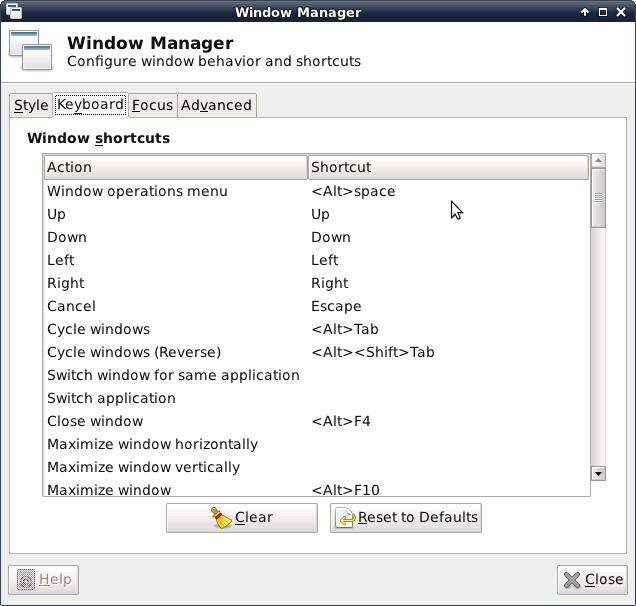
Turns out Xfce was assigning something called <Super>Tab to the Tab key...removing this binding allows auto-complete to function.
It can be reached by Settings --> Window Manager ---> Keyboard, as detailed in the following image:
Showing posts with label debian. Show all posts
Thursday, March 1, 2012
Tuesday, February 14, 2012
Handbrake GTK and Debian Squeeze
Handbrake isn't a stable package, you need to edit etc/apt/sources.list to allow testing packages temporarily...as in changing
###### Debian Main Repos
deb http://ftp.us.debian.org/debian/ squeeze main contrib non-free
deb-src http://ftp.us.debian.org/debian/squeeze main contrib non-free
###### Debian Main Repos
deb http://ftp.us.debian.org/debian/ testing main contrib non-free
deb-src http://ftp.us.debian.org/debian/testing main contrib non-free
###### Debian Main Repos
deb http://ftp.us.debian.org/debian/ squeeze main contrib non-free
deb-src http://ftp.us.debian.org/debian/squeeze main contrib non-free
To
###### Debian Main Repos
deb http://ftp.us.debian.org/debian/ testing main contrib non-free
deb-src http://ftp.us.debian.org/debian/testing main contrib non-free
Save, do a sudo apt-get update, followed by a sudo apt-get install handbrake-gtk, and watch those dependencies get met.
Remember, change back to the previous stable area when complete!
It will install a lot...or at least did for me. But success is reached at the end.
Friday, October 21, 2011
Truecrypt and Debian
Future self - the Truecrypt installer will complain about (gksudo:21149): GLiB-CRITICAL **: g_str_has_prefix: assertion 'str != NULL' failed
Press Enter to exit...
If you try and install it via the downloaded installer. What you should do is run the installer, and select 'Extract'.
It will dump a tar.gz into /tmp.
Extract that, and a folder called 'usr' will appear. Copy that folder where-ever you want. Inside BIN will be the truecrypt files.
You may need to play with permissions.
Subscribe to:
Comments (Atom)

