Wednesday, November 5, 2014

Phase Delay and Group Delay


One benefit of having used OneNote for around a year is that it can be referenced pretty easily for blog post ideas.  Today I'll be writing about phase and group delay through filters

I was looking into making a fractional delay filter at work the other day, and thought it was useful to have some pictures about what phase delay and group delay was.

Wikipedia defines phase delay as the time delay of the phase, where group delay is the time delay of the amplitude envelope.

A nearby textbook defines it as the difference in phase, at a particular frequency,  between an input sinusoidal and the output sinusoidal.

Make sense? Eh. Maybe. Let's make it more complicated before looking at pictures

In FIR filters, group / phase delay is a function of the sampling time and the number of taps:

   group delay = (S-1)*ts/2, where S is the number of taps

Group Delay is also the negative derivative of the phase delay

Let's look at an example:
    I've created a filter in Octave with the signal processing package, coeff=fir1(42,.5).  The frequency response is as follows:


Frequency Response


Paying attention to the phase response, we see it is linear.  An FIR filter if I've ever seen one!

So if I create a 15MHz sine wave sampled at 100MHz........with a ts of 1/100e6=0.01us


Input 15MHz @ 100MHz sampling

Based on the phase response above, 15MHz/50MHz=.3, and at .3 on the phase response gives a 1000 degree phase delay at 15MHz.   


Signal Output

Looking at this picture, we see that there is now ~21 sample delay from the first peak of the input signal to the peak of the output signal, or relative to the output signal, the input signal has processed ~3 360 degree cycles, or ~1000 degrees of phase delay.

Group delay wise, at fractional frequency .4, it looks like we're at ~-1500 degrees. This gives a slope of -3750 degrees per fractional frequency, or -65.43 radians per fractional frequency. Going back to the equation of a line,

           radians = -65.43 (radians / fractional frequency) * (fractional frequency wrt pi radians)

We end up with an extra pi element that needs to be divided out to get rid of radians and scaling for sampling time to get units of time.  This makes the group delay of -(-65.43/3.1415*ts) = .20833us for this filter.  Since the sampling frequency is 100MHz, the sampling time is .01us, a 21 sample delay = .21us.  

This also matches the formula above, of (42-1)*ts/2 giving a group delay of .205us 

Tuesday, October 28, 2014

Installing GNU Octave packages on Mac OSX

I had some issues installing packages for GNU Octave 3.8.0 on OS X Mavericks.  It seems a make file was not setup correctly in the octave folder.

pkg install <package_name> would fail

After searching around for a bit I came across the solution here:

http://lists.gnu.org/archive/html/octave-bug-tracker/2014-02/msg00691.html

The solution is replicated below:


edit /usr/local/octave/3.8.0/bin/mkoctfile-3.8.0 with the following:

> diff mkoctfile-*
53c53,54
< DEFAULT_INCFLAGS="-I$OCTINCLUDEDIR/.. -I$OCTINCLUDEDIR"
---
> #DEFAULT_INCFLAGS="-I$OCTINCLUDEDIR/.. -I$OCTINCLUDEDIR"
> DEFAULT_INCFLAGS="-I$OCTINCLUDEDIR/.. -I$OCTINCLUDEDIR
-I/Applications/Xcode.app/Contents/Developer/Platforms/MacOSX.platform/Developer/SDKs/MacOSX10.9.sdk/usr/include"


Thursday, October 23, 2014

Ubuntu 14.04 and RTL-SDR

Hello all -

Sorry for the long absence: It is mostly do to me starting to use OneNote to keep all my hard to find information together instead of using this blog.    It is a terrific program for keeping organized digital notebooks, and if you have a Surface Pro or other watcom compatible windows tablet, amazing for handwritten notes.

That aside, I started playing with my USB RTL-SDR with GNURadio again, and was surprised at how much easier it was to setup this time.  Previously I had to compile but the GNURadio and the RTL-SDR drivers myself, but now with Ubuntu 14.04 you can simply

sudo apt-get install gnuradio
sudo apt-get install gnuradio_dev
sudo apt-get install rtl_sdr

These commands will install all required to get started with the DVB-T2 receiver.

I ran into an issue where Ubuntu was autoloading a driver, giving an error when I would try and run an rtlsdr capture:

Found 1 device(s):
  0:  Realtek, RTL2838UHIDIR, SN: 00001096

Using device 0: Generic RTL2832U OEM

Kernel driver is active, or device is claimed by second instance of librtlsdr.
In the first case, please either detach or blacklist the kernel module
(dvb_usb_rtl28xxu), or enable automatic detaching at compile time.

usb_claim_interface error -6
Failed to open rtlsdr device #0.


lsusb showed...
Bus 002 Device 002: ID 8087:8000 Intel Corp. 
Bus 002 Device 001: ID 1d6b:0002 Linux Foundation 2.0 root hub
Bus 001 Device 002: ID 8087:8008 Intel Corp. 
Bus 001 Device 001: ID 1d6b:0002 Linux Foundation 2.0 root hub
Bus 004 Device 001: ID 1d6b:0003 Linux Foundation 3.0 root hub
Bus 003 Device 004: ID 0bda:2838 Realtek Semiconductor Corp. RTL2838 DVB-T
Bus 003 Device 003: ID 0b38:0010 Gear Head 107-Key Keyboard
Bus 003 Device 002: ID 192f:0416 Avago Technologies, Pte. ADNS-5700 Optical Mouse Controller (3-button)
Bus 003 Device 001: ID 1d6b:0002 Linux Foundation 2.0 root hub


dmesg | grep dvb
[ 1326.816881] usb 3-6: dvb_usb_v2: found a 'Realtek RTL2832U reference design' in warm state
[ 1326.873974] usb 3-6: dvb_usb_v2: will pass the complete MPEG2 transport stream to the software demuxer
[ 1326.914525] usb 3-6: dvb_usb_v2: schedule remote query interval to 400 msecs
[ 1326.915830] input: MCE IR Keyboard/Mouse (dvb_usb_rtl28xxu) as /devices/virtual/input/input15
[ 1326.919675] rc rc0: lirc_dev: driver ir-lirc-codec (dvb_usb_rtl28xxu) registered at minor = 0
[ 1326.929266] usb 3-6: dvb_usb_v2: 'Realtek RTL2832U reference design' successfully initialized and connected
[ 1326.929302] usbcore: registered new interface driver dvb_usb_rtl28xxu

The hell!  Get off of my USB stick.  It isn't for you!  Let's temporarily remove it

sudo rmmod dvb_usb_rtl28xxu

Ah, there we go.  Capturing data.  This sequence will unfortunately need to be repeated overtime you plug in the RTLSDR, unless you permanently blacklist it in your mod probe file   


Wednesday, February 20, 2013

Galaxy Nexus and Nexus 7 rules.d settings

1): Create a file in /etc/udev/rules.d called 51-android.rules
2): Fill that file with the following:

SUBSYSTEM==”usb”, ATTR{idVendor}==”04e8″, ATTR{idProduct}==”6860″, MODE=”0666″, OWNER=”your_user_name”
SUBSYSTEM==”usb”, ATTR{idVendor}==”18d1″, ATTR{idProduct}==”4e42″, MODE=”0666″, OWNER=”your_user_name”


restart the udev service

Thursday, January 24, 2013

Rich Block Poor Block

A really interesting site, using data from the census, on a per zip code basis (I think)

http://www.richblockspoorblocks.com/

Wednesday, January 23, 2013

Compiling Altera Libraries for Modelsim DE

One thing I do rarely is compile Altera libraries for simulation, and when I have to it involves web searching.  Anyway, now it is appearing here so I don't have to think about it anymore

This example compiles the altera_mf.v file into a library.  Update the path accordingly, as of this moment I am using quartus 11.1.  The main thing is paying attention to where altera_mf.v can be found


vlib altera_mf_ver
vmap altera_mf_ver altera_mf_ver
vlog -work altera_mf_ver C:/altera/11.1/quartus/eda/sim_lib/altera_mf.v

Sunday, January 13, 2013

Juniper VPN, Network Connect, and Linux

I need to use Juniper VPN and Network Connect to remote to my work's network.  Network Connect chooses to use 32-bit java, which upsets most 64-bit systems.  Don't worry, it won't actually tell you this, it will just crash randomly

The following forum solved most of my issues.  Basically you are installing a 32-bit browser with a 32-bit java plugin, after which Network Connect will well, connect

http://ubuntuforums.org/showthread.php?t=2067521


Thursday, August 30, 2012

Xilinx + Modelsim

I keep forgetting how to compile Xilinx libraries and import them into modelsim...so here goes a list


use compxlib from appropriate Xilinx version, select version of modelsim (in my case 10.0d)
--Will output to Xilinx\Ver##\ISE\verilog\modelsim_10dbli

In Modelsim, right click work, add library

DONE

Simulate and include the appropriate libraries as so...
vsim -L SimPrim_Vers10 -L UniMacro_Ver10 -L UniSim_Ver10 -L XilinxCoreLib_Ver10 work.afe_tb work.glbl

Remembering to include the global file glbl

Tada!

Thursday, June 21, 2012

Colleges and Alumni donations

My grad and undergrad alumni associates have decided to call me as often as possible, in attempts to get donations.  

I'm always confused by this.  The time period in which I give them money in exchange for goods or services has past.  This isn't like PBS, which I actively use

Target does not call me up to see if I'm enjoying the Gatorade I purchased from them, and ask me if I would like to pay them more retroactively for it

Particularly undergrad -- you guys didn't bother to give me scholarships, opting for more need based over academic based.  Sorry friends, knock on those people's doors

Sunday, June 10, 2012

Birth Control Statistics in GNU Octave

Hello!  A fun thought occurred to me while looking over an old statistics textbook -- how effective is our birth control?

For the sake of argument, lets say that condoms, used properly, have a 97% effective rate.  A birth control pill, properly used, have a 99% effective rate.  Those may sound high, but they aren't really.  Lets take a look and assume you are having sex once a week for two years. What is the likelihood that you will have at least one condom break, the pill be ineffective, or both failing simultaneously? Rut Roe!

Since each condom use can be considered an independent test, the probability of failure is 1 - 0.97, or 3% chance of failure.  Similarly, the pill would have a 1% chance of failure.  The data is as follows:

Probability of faulty birth control method over time

What does this graph tell us?  It is 1- (the chance of getting X amount of condoms in a row that are successful), or  the ever increasing chance that your next condom / birth control pill, combination will be faulty.  As the blue line shows, over two years, or 104 condom uses, you have a ~95% chance of one of those condoms being defective and failing.  With straight birth control and 104 tests, you have a 63% chance that at least one time it did not work.   The best though, is the redundant method: The chance that during a two year period that both the condom and the birth control would fail at exactly the same time.  This would be the same as modeled as a system in parallel:
 (1 - 0.03*0.01) = 99.7% individual chance of success with some kind of protection in parallel system per sexy times.  Hooray.  The green line shows that over 104 weeks,  the chance of double failure is nearly negligible.  This is the way to be!

So wait wait wait, a failed condom or birth control pill does not necessarily mean pregnancy occurs.  Every menstrual cycle, there are about ~5 days of which sperm in the system could meet an egg.  5 days out of every 28, or ~18% of all days in a year.  This reduces the 1 / week for 104 week chance of issue significantly, as the following graph shows:

This graph basically states that, having random sex once / week, over two years, presents a 17% chance of a condom breaking while in ovulation, a 11% chance of the pill not working during ovulation, and basically a 0% chance of the pill and the condom breaking at exactly the same time.

Lesson in all of this?  Redundancy in parallel systems is the way to go.

Saturday, April 21, 2012

Dragon Laser Viper 55mW review

The Viper 55mW green laser

I like lasers.  It all started when I was getting married.  We needed presents for all the guys in our wedding party, but didn't want to go with something normal like a tie, or a flask.  Queue lightbulb -- something severely dangerous and with no practical use

An awesome laser.

That batch of lasers came from wickedlasers.com.  They were of okay quality.  3/4 lasers worked perfectly.  The last one worked intermittently, and appeared to have a short in it based on my testing.  They were also more expensive than comparative lasers purchased elsewhere, but I went with a "name brand" company I had heard of for my first purchase.

Still, I was hooked.  After some research, many people recommended dragonlasers.com.  A friend of mine was getting married, and I thought, "yes, lasers are the new wedding china", and used this as an excuse to give dragonlasers a try.

I was not disappointed.  Shipping is from Beijing, which accounts for most of the delay in between pushing the buy button and having the laser in my hands.  This box will need to go through customs if you are shipping to the US, which was a giant pain.  The shipping method was trackable via USPS, but after customs tracking stopped.  It claims to be in customs now, despite having been in my hands for several weeks.

I would say it took them about a workweek to get the laser shipped, followed by a two week wait on getting it to my door.  Not too bad for the price they charged for shipping, considering the oceans it had to cross.

The build quality is excellent.  It is heavy in my hand, and feels solid.  This is in noticeable contrast to my WickedLaser's purchases.  It isn't that WickedLasers is cheap feeling, it is just that DragonLasers is a much higher quality.

Unlike WickedLasers, however, DragonLasers hand held laser pen does not appear to have a safety feature.  The laser from Wicked had the ability to take a "pin" out, effectively cutting power even with the two AA batteries in.  No such feature exists on DragonLasers, so care must be taken as you are wielding a dangerous toy.

Here is a picture of me shining the green Viper at a wall in my home

Large green dot

I took it outside, and kept the shutter on my camera open for 8 seconds, while I moved it around...most likely scaring the neighbors
Looks almost like a photoshop filter

The beam is highly visible at night, and I am working on capturing that in picture form.

Overall, I highly recommend dragonlasers.com for their excellent quality hand held lasers.  Just be prepared to wait, as not everything can be 2-day shipped from Amazon.com  

I would like to do some power measurement tests in the future, as well as a total usage / set of batteries measurement.  The laser itself runs on two AAA batteries, meaning to achieve 55mW we're looking at a current draw of ~0.017A or 17mA.   Given the low side of alkaline AAA batteries are rated for 250mAh, that is going to theoretically give a use time of around 14 hours between changes.
The laser resting itself after a long day of blinding me


Thursday, March 1, 2012

Xfce Tab and auto-complete terminal via VNC

I switched my windows system from Gnome to Xfce4 for a change, and ran into an interesting problem:  After I configured my ~/.vnc/xstartup profile to use the new window system, anytime I'd attempt to auto-complete in terminal (/ho<tab> for /home, for instance), the cursor would just blink, and no auto complete would occur.

This only seemed to happen with VNC sessions, but I did not explore this much because of the headless nature of my server.

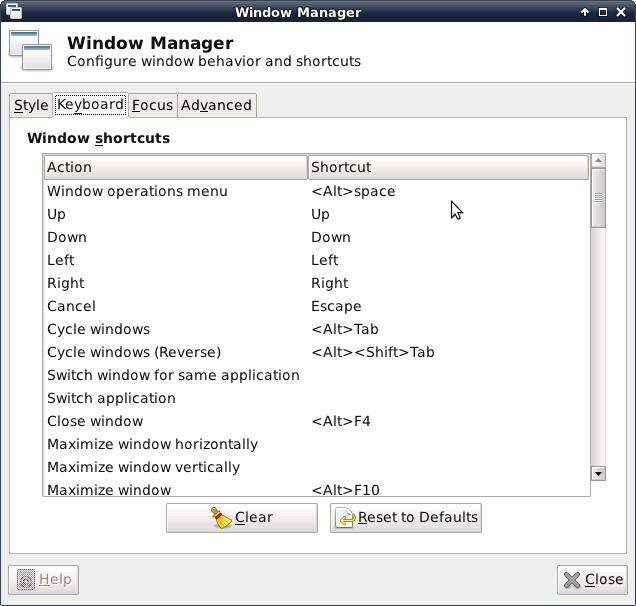
Turns out Xfce was assigning something called <Super>Tab to the Tab key...removing this binding allows auto-complete to function.

It can be reached by Settings --> Window Manager ---> Keyboard, as detailed in the following image:


Setting up an SSH server in a Debian derivative

sudo apt-get install openssh-server

done!


Tuesday, February 14, 2012

Handbrake GTK and Debian Squeeze

Handbrake isn't a stable package, you need to edit etc/apt/sources.list to allow testing packages temporarily...as in changing


  ###### Debian Main Repos
deb http://ftp.us.debian.org/debian/ squeeze main contrib non-free 
deb-src http://ftp.us.debian.org/debian/squeeze main contrib non-free


To


  ###### Debian Main Repos
deb http://ftp.us.debian.org/debian/ testing main contrib non-free 
deb-src http://ftp.us.debian.org/debian/testing main contrib non-free


Save, do a sudo apt-get update, followed by a sudo apt-get install handbrake-gtk, and watch those dependencies get met.

Remember, change back to the previous stable area when complete!

It will install a lot...or at least did for me.  But success is reached at the end.  

Monday, January 30, 2012

Sign extension in VHDL

Okay, I am using VHDL at my new job, and haven't used it in years.  I was trying to sign extend basic logic circuits and it was driving me crazy.  Finally I found this, and it seems like it works:

Input signal to sign extend was
 
wimax_out       :in  std_logic_vector(15 downto 0); -- output of wimax modulator


in the architecture area...


-- sign extent input to 18-bits
wimax_sign_ext_18                             <= wimax_out(15) & wimax_out(15) & wimax_out;

-- sign extend to 48-bit C input
wimax_sign_ext_48(47 downto 16)     <= (others => wimax_out(15));
wimax_sign_ext_48(15 downto 0)       <= wimax_out;


So concating works (&) and the others => work, at least according to modelsim and the 'signed decimal' signals.  I am willing to bet other methods work, or perhaps work more properly, but I do not care

Verilog all the way


Thursday, January 12, 2012

FPGA Timing

All right, I keep forgetting how FPGA timing works, so I'm writing it down here so I don't have to continue to search the internet

There are four main time periods we care about dealing with FPGA timing: Tclk, Tsu, Th, and Tco.


  • Tclk is the period of the clock the registers in question are synchronous to.
  • Tsu (Setup time) is the amount of time before the edge trigger of a register that the data must be settled on the input of the register
  • Th (Hold time) is the amount of time after the edge trigger of a register that the data must remain stable on the input of the register
  • Tco (Clock to output time)  is the amount of time from the edge trigger of the register to when the newly latched data is available as an output.

FPGA Timing Diagram Example

Here is an attached picture of three registers on the same clock, with the above time periods
From this we can see the amount of time a signal has to get from one register to another register in an FPGA is defined as
Time Skew = (Tclk - Tco - Tsu)

Skew is eaten into by delay that is a function of the speed of light, the trace material dielectric, the width of the trace, and probably something else I am forgetting.

These rules hold true in SDR or DDR -- we just care about the data with respect to the appropriate edge.  It can get more complicated with Center Aligned data or Edge Aligned, or dealing with external interfaces to the FPGA, but the main rule applies:

Data has to be there a certain amount of time before and after the sampling edge (Tsu and Th), and will take a certain amount of time before being available as an output (Tco), and is constrained by the clock period (Tclk) and the laws of physics.

Friday, October 21, 2011

Truecrypt and Debian

Future self - the Truecrypt installer will complain about (gksudo:21149): GLiB-CRITICAL **: g_str_has_prefix: assertion 'str != NULL' failed
Press Enter to exit...

If you try and install it via the downloaded installer.  What you should do is run the installer, and select 'Extract'.

Truecrypt Installation


It will dump a tar.gz into /tmp.

Extract that, and a folder called 'usr' will appear.  Copy that folder where-ever you want.  Inside BIN will be the truecrypt files.

You may need to play with permissions.

Sunday, October 16, 2011

Samba, Debian, and Windows 7

I have a headless linux computer I use mainly as a file server, but also as a bit of an open source science toy.  I can start a ssh / VNC to it from anywhere in the house.  Until recently, it was running Ubuntu 11.04.  I attempted an upgrade to 11.10, but something went wrong and it left the system in a less than optimal state.

That's all right though, I was looking for an excuse to simplify it to straight Debian.   The Debian install went well, though I noticed I took for granted many of the packages that came installed by default in Ubuntu. (make anyone?)  A few apt-gets fixed all of that, though, and I was left with the last headache I remembered:  properly configuring samba to work with my Windows 7 computer.

"This shouldn't be hard", I thought remotely.

The best walkthrough I found was on http://www.unixmen.com/linux-tutorials/1524-standalone-samba-in-debian-squeeze - I simplified it a bit, since I'm okay with home users having access to their own directories.

My path went something like this:


  1.  Make my Windows 7 workgroup name WORKGROUP by clicking start, right clicking "Computer", and hitting "properties" 
  2. Install samba on the Debian computer with 'sudo apt-get install libcupsys2 samba samba-common'
  3. I don't care about domain name for my simple setup, and I make sure my default workgroup is titled WORKGROUP during setup
  4. After completion, sudo edit /etc/samba/smb.conf and uncomment the line 'security=user'
  5. Under the [homes] section, add "valid users = my_username"
  6. change the "read_only" from YES to NO to enable writing
  7. save, quit, and restart samba with a sudo /etc/init.d/samba restart
  8. FINALLY, remember that samba doesn't have access to your Linux login....so you must set the samba password for your username separately via 'sudo smbpasswd -a username'
At this point, you should be able to access the linux home directory, from windows, by typing in the network IP address into the path of a window...such as
\\192.168.1.9 and login with your user name and samba password

Tada


Saturday, August 27, 2011

Another Note to Self

In Android, to get things to center properly, use the android:gravity tag in the Layout surrounding it....


<LinearLayout
  xmlns:android="http://schemas.android.com/apk/res/android"
  android:orientation="horizontal"
  android:layout_width="fill_parent"
  android:layout_height="wrap_content"
  android:gravity="center">
 
<Button   android:text="Add"
          android:id="@+id/button_dialog_set"
          android:textStyle="bold"
          android:layout_width="wrap_content"
          android:layout_height="wrap_content"
          >
</Button>
<Button   android:text="Cancel"
          android:id="@+id/button_dialog_cancel"
          android:textStyle="bold"
          android:layout_width="wrap_content"
          android:layout_height="wrap_content"
          >
</Button>
</LinearLayout>


Produces two buttons, centered, next to each other

Tuesday, August 23, 2011

GNU Octave plots

Because I can't afford Matlab, I have been experimenting with GNU Octave on my Linux computer.  It is very expandable via free packages, and seems more command line based.

Anyway, this entire post is to remind myself that you can capture plots via the 'print command' and the following syntax:

print -djpg filename.jpg ....it took a while to understand the help print command, and that you are specifying the 'device' via the print -dFILETYPE_OR_DEVICE syntax

In conclusion, here are some plots of the LMS algorithm converging on a static, unknown system:

Elements Converging

Error Converging